使用 Dify 实现跨平台文案自动化创作
摘要:
本文介绍如何利用 Dify Chatflow 构建跨平台文案生成工作流。通过集成 Jina AI 进行网页抓取、LLM 多分支并行处理及图片链接提取,自动将博客内容改写为小红书、Instagram 和 Twitter/Threads 风格,并附带配图链接,实现高效的多渠道分发。
Cross-Platform Copywriting with Dify (使用 Dify 打造跨平台文案工作流)
对于社交媒体博主和企业而言,“跨平台文案创作”是一个常见的工作场景。通常的流程是:从公司博客或公开网页获取原始文案和图片;随后根据目标社交平台的风格重写文案,并挑选合适的配图;最后发布到各个社交平台——既然内容已经创建好了,为什么不触达更广泛的受众呢?
让我们一步步拆解这个流程,展示如何设计这样一个聊天工作流(Chatflow)。开始吧!
Chatflow 概览
首先,我们需要为 Chatflow 中所需的 LLM(大语言模型)和工具获取授权:
* JinaReader API KEY
* TEXT2IMAGE Node API KEY (getimg.ai)
* LLM KEY (例如 Claude)
整个过程可以分为两个主要部分。第一部分是从指定网页抓取数据,基于预定义的语调制定改写策略,同时为小红书(Redbook)、Instagram 和 Twitter/Threads 生成文案。第二部分是将网页中的图片整理为链接形式,最终利用推文文案输出包含图片链接的内容供后续使用。至此,整个流程完成。
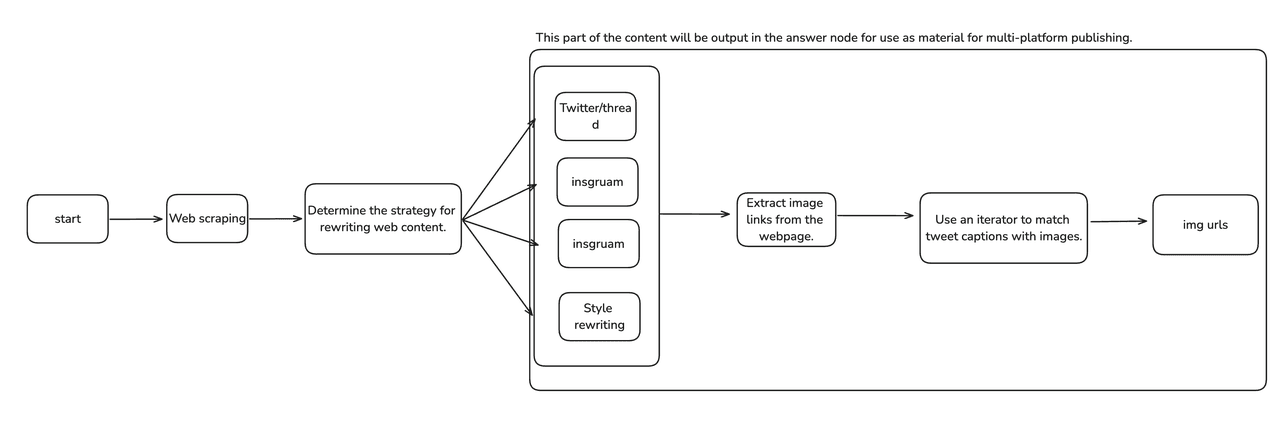
配置起始节点与对话开场白
这是 Dify 为每种应用类型提供的通用功能。
1. 点击右上角的 “Features”(功能)。
2. 启用 “Conversation Launcher”(对话启动器)功能。
3. 输入英文文本:“When you’re ready, click the Start button below 👇”。
4. 将默认回复设置为 “Start”。
这样,界面看起来就像一个“开始按钮”,引导用户操作。

你可以在起始表单中添加变量(Form Variables),用于在 Chatflow 开始时输入参数。这样可以约束/标准化用户行为,同时确保输入的稳定性。由于后续节点需要进行网页抓取,因此必须从一开始就提供 URL。语调(Tone)则会在基础策略节点中使用,以确定文案的风格。

使用 Jina AI 工具进行网页抓取
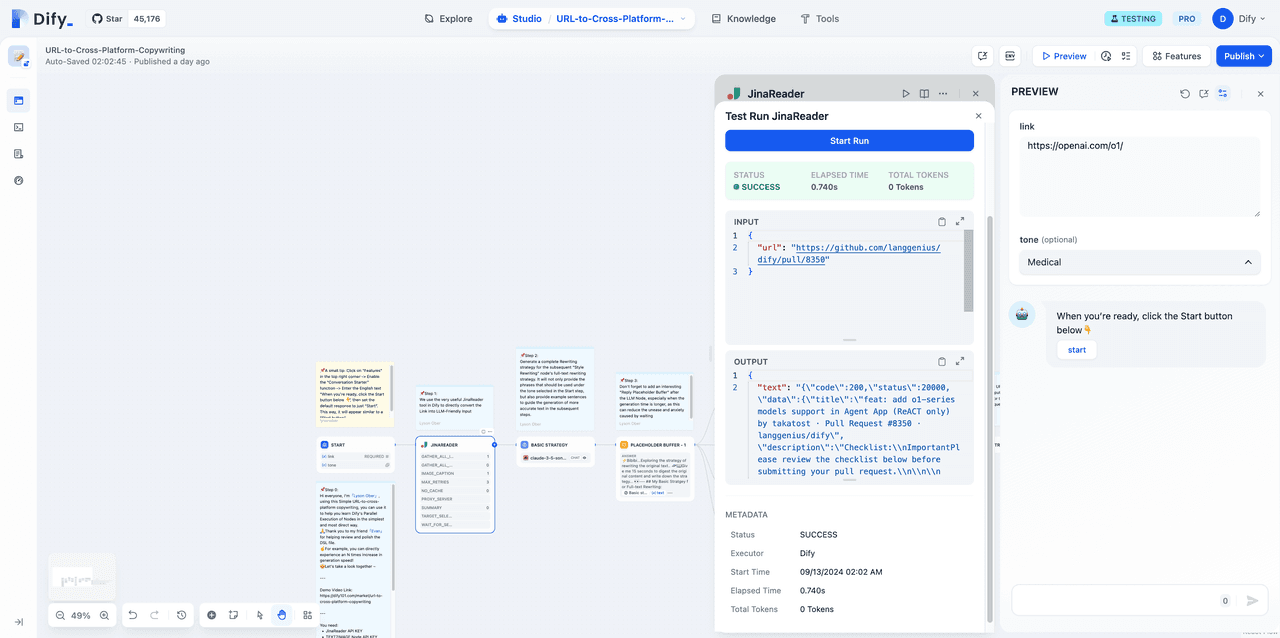
利用 Jina AI 工具,你可以将具有复杂布局格式的 URL 文本解析为 Markdown 格式,便于后续处理。这些解析后的文本也将作为多平台发布的基础素材。
使用方法非常简单:只需授权、输入 URL,并配置页面以开启图片标题识别(image captioning),最后收集所有图片链接即可。

跨平台风格改写
在这里,你可以使用 Dify 版本 0.8.0 新增的并行执行(Parallel Execution)功能。同时启动四个分支的操作有助于避免连续运行五个 LLM 节点导致的长时间等待。
别忘了在 LLM 节点后添加一个有趣的“回复占位符缓冲”。特别是在生成时间较长的情况下,这能有效减少用户因等待而产生的不适感和焦虑感。
这种技巧可用于流程中任何需要较长加载时间的答案(Answer)节点之前;这是在 Dify Web App 中提升用户体验的绝佳方式。
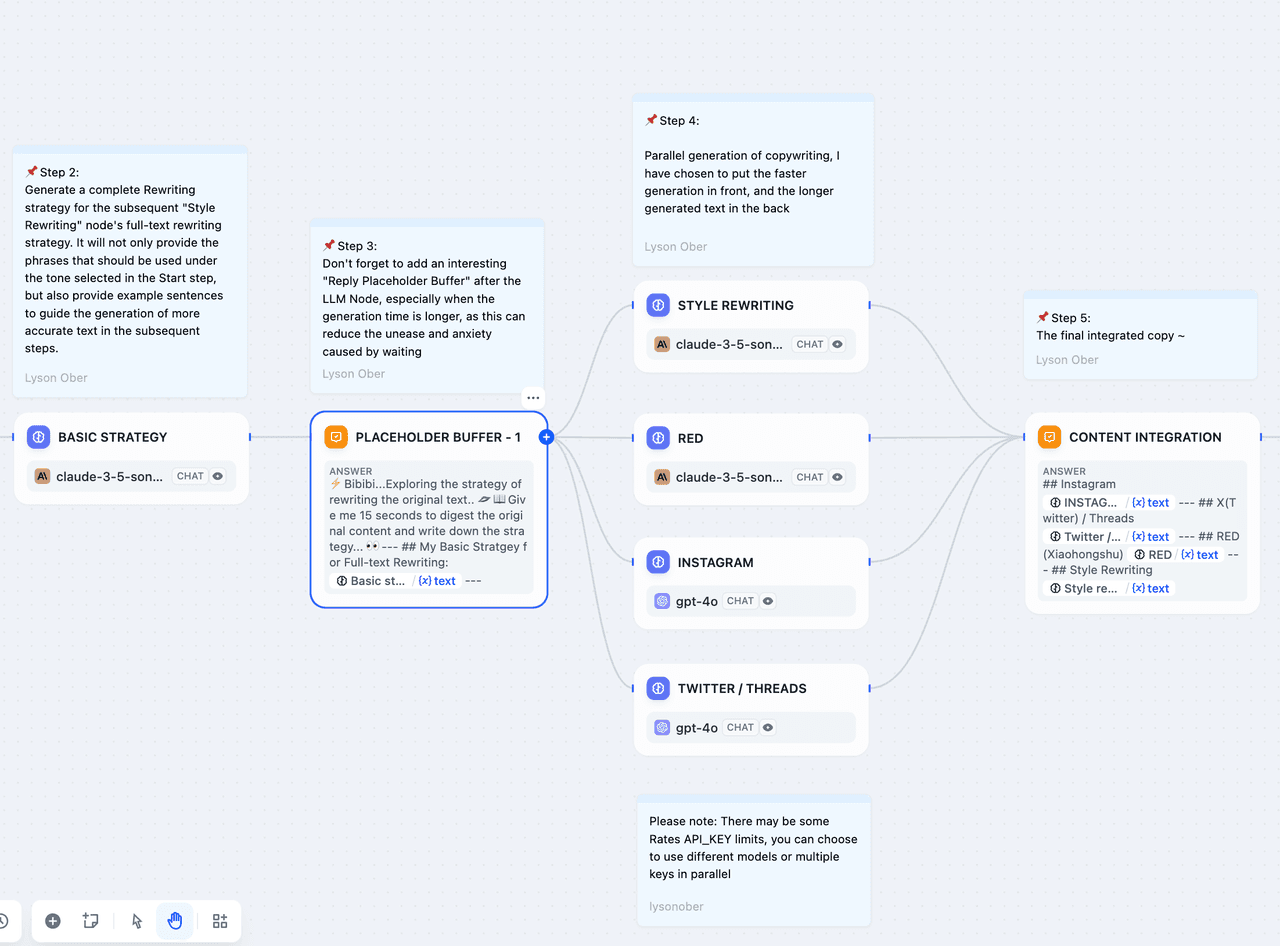
我们可以以 Twitter(现 X)为例,查看具体的 Prompt 设计:此提示词可用于生成符合 Twitter Threads(推文串)风格的文案。对于时效性要求极高的信息,我们可以利用该应用快速将网页新闻同步到各大社交媒体平台。
Twitter Thread 生成 Prompt 示例
You are tasked with creating a Twitter thread based on a given article.
Your goal is to summarize the main points of the article in a series of tweets while maintaining the original style and avoiding marketing language.

Here's how to approach this task:

First, carefully read the following original text:
<original_text>
</original_text>

Now, follow these instructions to create the Twitter thread:

1. Analyze the text and identify the main points and key ideas.
2. Break down the content into a series of concise tweets. Each tweet should be self-contained and convey a complete thought or idea.
3. Aim for 5-8 tweets in total, depending on the length and complexity of the original text.
4. Keep each tweet within the 280-character limit.
5. Number each tweet at the end, indicating its position in the thread. For example, "2/8" for the second tweet in a thread of eight tweets. Place this number on a new line at the end of each tweet.
6. Maintain the style and tone of the original text. Do not use marketing language or try to sensationalize the content.
7. For the first tweet, create an engaging opening that encourages users to read the entire thread. End this tweet with "Here are the details 👇🧵" to indicate that more information follows.
8. In the last tweet, provide a brief conclusion or summary of the main takeaway from the article.

When you're ready to present the Twitter thread, format your response as follows:
<twitter_thread>
<tweet1> [Content of first tweet]
1/[total number of tweets] </tweet1>
<tweet2> [Content of second tweet] 2 / [total number of tweets] < /tweet2>
[Continue with remaining tweets]
<tweet[n]> [Content of last tweet] [n]/[total number of tweets]< /tweet[n]>
</twitter_thread>

Remember to maintain the original style and avoid marketing language throughout the thread. Focus on accurately conveying the information from the original text in a concise and engaging manner.